Performing Interconnection Studies with a Wide-Area EMT Model with sensitive Information through a Cloud Portal
Anton STEPANOV, Henry GRAS, Alexei DANELYUK, Jean MAHSEREDJIAN - PGSTech, Canada
Víctor VELAR - CEN, Chile
Sebastien DENNETIERE, Cesar MARTIN - RTE, France

Summary
To evaluate grid reliability, transmission system operators (TSOs) perform electromagnetic transient (EMT) studies with models of inverter-based resources (IBRs) that are about to be integrated into the grid. During these studies, TSOs need to work with generation owners (GOs) to appropriately tune IBR models, and due to intellectual property and confidentiality concerns, lots of back-and-forth communication is required until the IBR model becomes acceptable.
This paper proposes an online platform enabling GOs to conduct studies using protected wide-area EMT grid models without direct TSO interaction or accessing confidential data. This reduces the time and effort to tune the GO IBR models before final submission.
The platform consists of a web interface, data storage, virtual machines, and an orchestrator. It is a cost-effective solution that allows to assess the performance of IBR models in a large set of realistic operating conditions. Multiple studies can be performed online in parallel, with a speed comparable to offline simulations. Monthly cost for storage and core services is below 200 USD.
Keywords
Connection Tool, Electromagnetic Transient, Grid Interconnection, Inverter-Based Resources, Modelling, Simulation, Transmission System1. Introduction
Power grids are integrating an increasing number of inverter-based resources (IBRs), whose behavior differs significantly from that of traditional rotating machines. This shift poses new challenges to power system reliability.
During the interconnection process, generation owners (GOs) are often required to submit an electromagnetic transient (EMT) model of their generation plant to the transmission system operator (TSO). These models are used by GOs to demonstrate that their generation facilities are configured and tuned to meet grid code requirements.
Before submitting the model to the TSO, GOs typically conduct tests using a simplified short-circuit equivalent of the grid. While these equivalents enable a limited set of tests, the responsibility often falls to the TSO to perform more comprehensive simulations using a detailed and precise model of the transmission grid. This approach is time-intensive and frequently involves multiple iterations between stakeholders, particularly in complex grids with numerous interacting IBRs. Sharing the complete TSO grid model with IBR owners or operators is often not feasible due to security concerns or the inclusion of confidential models governed by non-disclosure agreements. The challenge is compounded by the rising number of interconnection requests [1].
A promising solution is to give GOs controlled access to the TSO’s wide-area EMT model through a secure, cloud-based environment. In this setup—called a Connection Simulation Tool—the full grid model remains protected. GOs can upload their generation model, run simulations, and retrieve results, without being able to download or view details of the complete wide-area network.
In 2023, the first such tool was publicly released in Australia. It allowed GOs to upload EMT models and access a remote desktop environment where only interconnection buses are visible. Users can manually connect their generator models, run simulations, and monitor results. However, this remote desktop approach has limitations: it is not well-suited for running large batches of simulations, plus the cost implications may be significant to ensure security; for example, the existing tool cost AUD 4.26 million [2]. Moreover, it lacks a built-in load-flow solver, meaning GOs cannot initialize EMT simulations from arbitrary power flow conditions.
The Connection Simulation Tool described in this paper has been developed for use in transmission system interconnections with transmission system operators of Chile and France. It uses an existing EMT simulation software with built-in load-flow solver [3] for EMT simulations, allowing GOs to customize initial conditions before launching EMT runs [4]. Currently, the tool is in the last testing phase before official deployment.
This paper will first outline the main aspects of the proposed Connection Simulation Tool, then typical user roles and responsibilities. Following this, the paper will describe the IT infrastructure used to host the tool on a commercially available cloud platform. Finally, the simulation performance and costs at the time of the project’s initial deployment are given.
2. Connection Simulation Tool Overview
The Connection Simulation Tool is a cloud-based online portal that allows to perform EMT simulations during the grid interconnection process. It consists of a web interface, data storage, virtual machines (VMs), and the orchestrator that links these elements together.
2.1. Orchestrator
The Orchestrator is the backbone of the proposed platform. It is a program that manages file transfers between the web portal, the storage and the virtual machines. It also launches the simulations on the virtual machine, updates the web portal with the progress of the simulation, and sends the results of the simulation back to the portal once they are available.
2.2. Operating cycle
Operating cycle of an interconnection project with the Connection Simulation Tool is as follows:
- TSO uploads required grid designs for an interconnection project to the platform, generates a grid placeholder (see section 2.3), and shares it with the GO.
- GO develops a model of the generating plant, prepares simulation designs using the grid placeholder, and uploads their simulation designs to the platform.
- Once a GO design is uploaded, a CD/CI pipeline provisions a virtual machine (see section 4.1). If multiple designs are uploaded, they are queued and simulated in parallel.
- On the VM, the grid placeholder is replaced by the corresponding grid model. Load-flow and time-domain simulation of the combined system starts.
- Once the simulation is over, the simulation results become available for download (GO can visualize the results as if the simulation had been run on a local computer).
- The VM used for simulations enters waiting mode, checking if any other design becomes available for simulation.
These steps are presented schematically in Figure 1 below.
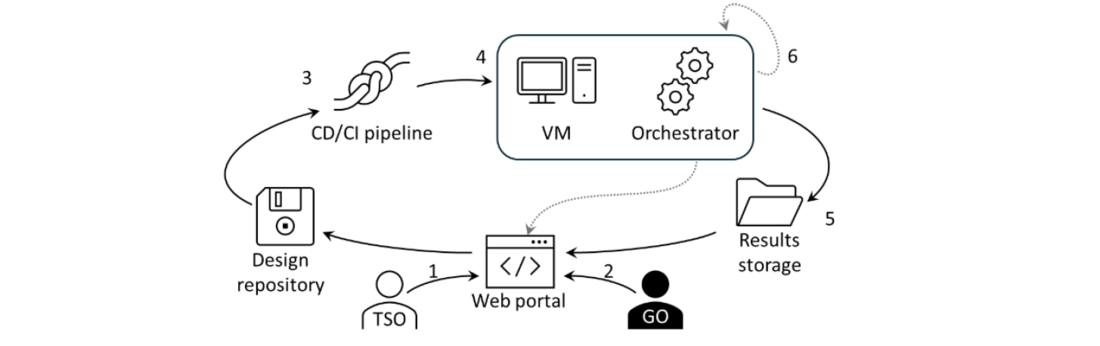
Figure 1 – Operating cycle diagram
2.3. Grid placeholder
To enhance cybersecurity, GOs are not granted remote desktop access. Instead, they configure simulations on their own computers using a grid placeholder device, such as shown in Figure 2. This device is provided by the TSO to represent the grid model in the GO designs submitted for simulation to the Connection Simulation Tool platform.
Grid placeholder device contains:
- A pre-defined set of buses to which the GO model can be connected in the grid.
- A pre-defined list of grid configurations that GO can select from to set up a particular simulation study (see section 2.4 for more information on grid configurations).
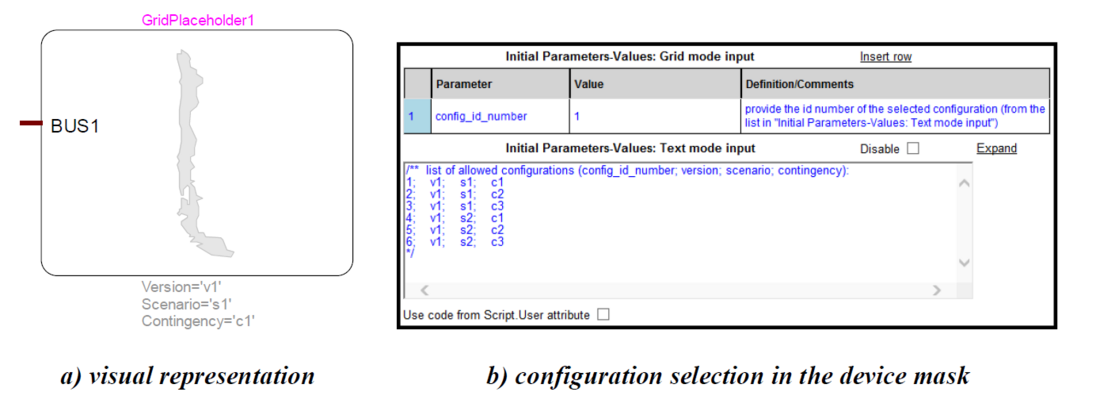
Figure 2 - Grid placeholder device design
2.4. Grid model configuration
To be able to fully evaluate the performance of the GO generation plant model, grid designs for each interconnection project must include a wide range of operating conditions in which the
generation plant is supposed to operate. The Connection Simulation Tool focuses on three different aspects of operating conditions:
- Grid version: state of the grid at a given date/time. This includes different in- and out-of-service lines, generators, transformers and their tap changer positions, etc.
- Scenario: different load/generation levels, that change throughout the day, week or year.
- Contingency: e.g. faults (symmetric or asymmetric) with different parameters and at different locations in the grid, assuming other equipment out-of-service (n-1, n-2), etc.
Grid model configuration is defined as a combination of grid version, scenario and contingency.
3. User roles and actions
The proposed Connection Simulation Tool allows for different user roles. The basic roles are the infrastructure administrator (can be from the TSO or another managing entity side), the platform administrators (from the TSO side) and the platform users (from the GO side). The infrastructure administrator can create, manage and delete platform users/administrators and has access to all uploaded files. Only very few people need to have this role.
3.1. TSO tasks
For each interconnection study, platform administrators prepare grid designs, set up a project on the platform and send grid placeholder (see section 2.3) to the corresponding platform user.
3.1.1. Setting up a project
To set up a project, the platform administrator needs to provide the following data:
- Project name.
- Project ID for identification and linking with an existing project management system.
- GO associated with the project.
- List of buses to which the GO model will have access to (typically, the POI bus).
- Grid designs.
3.1.2. Grid designs
As mentioned in section 2.4, the Connection Simulation Tool focuses on three different aspects: grid versions, scenarios and contingencies. Each grid design uploaded to the platform must have the following items:
- Design file that contains a version of the grid model.
- Dependencies: all DLLs, data files, etc. that are required to run the grid design.
- Additional data: design ID, grid version, load scenario, dynamic contingency, list of buses in the grid model.
Once uploaded, the same grid design can be used in multiple projects.
It is important to make sure that load-flow computations converge for each grid design. This can be done before uploading the designs to the platform by representing the GO model as a PQ or PV node in load-flow using max/min power that the generation plant can produce.
Once all grid designs have been created, the platform administrator needs to create a “Grid placeholder” device (see section 2.3) and share it with the corresponding GO.
3.2. GO tasks
For each interconnection study, a platform user needs to prepare the model, prepare designs for uploading, run the simulations and download simulation results.
3.2.1. Preparing the model
The EMT model of the GO generation plant is expected to have the following features:
- It is represented in load-flow simulations by a load-flow bus (PQ or PV).
- It has a flat-start initialization from the load-flow results.
- Dependencies such as dynamic link libraries (DLLs) should not require installing additional libraries on the platform. All required files should come with the model itself.
3.2.2. Preparing designs for upload
Platform users must receive a Grid placeholder device for the project. It represents the grid and allows to select the desired configuration of the grid (see section 2.3 for details). For each configuration that needs to be simulated, a separate design must be created. In each design, the GO model must be connected to the grid placeholder, as shown in Figure 3, and the appropriate configuration must be selected in the grid placeholder (version, scenario, contingency). If required, various initial conditions and control settings may be applied to the GO model: initial active and reactive powers, PPC control type, etc. It is suggested that the model has various scopes (saved signals) to facilitate analysis of the results.
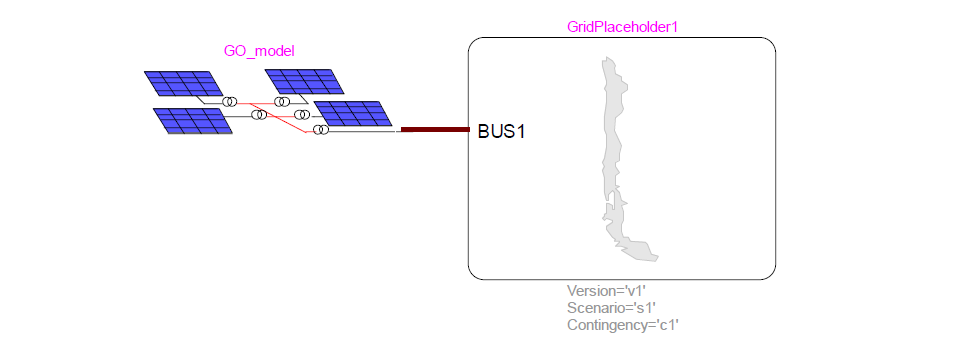
Figure 3 – GO model connected to a grid placeholder
3.2.3. Running simulations and results analysis
Once all required designs have been prepared, each design has to be converted to a zip archive and uploaded for the simulation on the platform. Multiple archives can be uploaded at once, they will be simulated in parallel on different virtual machines.
Once the simulations are over, platform users can download the results and analyze the scopes. If the model does not meet the required performance targets, it can be updated and tested again using the steps described in sections 3.2.1, 3.2.2, 3.2.3.
4. Implementation
4.1. Virtual machine creation
Several approaches for the virtual machine (VM) provisioning are considered:
- Creating an “empty” VM and installing the EMT simulation software on it.
- Cloning a VM with a pre-installed version of the EMT simulation software.
Creating VMs is easier to implement due to the availability of a solution but takes longer to start a simulation (25-30 minutes). Cloning requires more development effort but allows to start simulations faster (5-10 minutes). When a GO uploads the model to the platform, a CD/CI pipeline is started to provision a VM using one of the above methods. Once a VM is provisioned, the required files are downloaded from the storage.

4.2. Database organization
The portal uses database for storing all required information. The database is stored in the cloud services and can only be accessed by select machines with the required credentials through a whitelist. It has two sections: user management and simulation management (see Figure 4).
The user management section includes tables for users, roles, and organization units. Users can have multiple roles and belong to various organization units, defining access and data separation. Roles control platform permissions, while organization units separate GOs and group their simulation work.
The simulation management section handles simulation designs (grids), projects, jobs, buses, and virtual machines. Simulation designs include metadata (e.g., version, scenario, contingency) and are stored in a cloud storage. Projects link grids and organization units, ensuring only authorized users can manage them. Virtual machines are tracked for status and usage, enabling automated simulation deployment and teardown. Simulation jobs store execution info, files, results, and errors, with access controlled by project and org unit IDs. The buses table logs bus data extracted from uploaded designs to support detailed simulation setup.
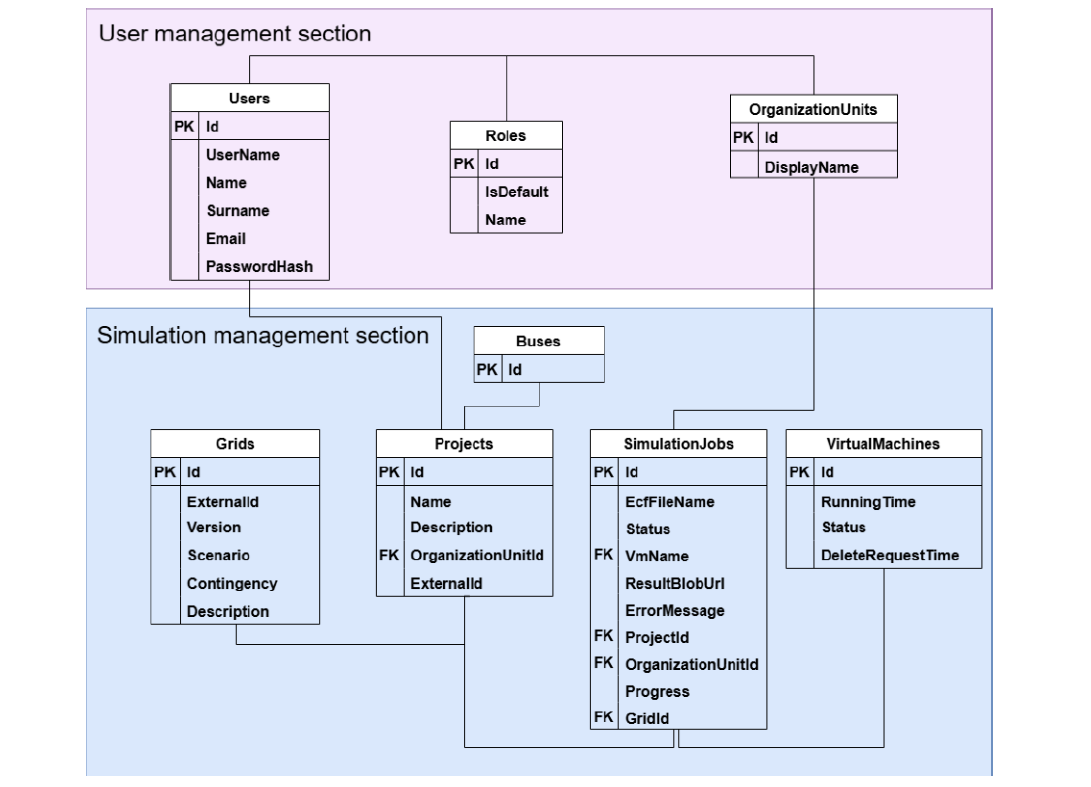
Figure 4 – Database organization
4.3. Cyber-security
4.3.1. Infrastructure security
The Web Portal uses username and password for authentication (the password is cryptographically hashed before being stored in the database) and hands out a temporary “session token”. This token ensures the user stays signed in while navigating the Web Portal as well as gets signed out after a period of inactivity (Figure 5, No.1).
Users can upload files (Figure 5, No. 2) and download results (Figure 5, No. 4). Both actions are accessible only with certain permissions. The results are retrieved through a temporary link. When the “Download” button is pressed, a new download link is created. After a timeout, this link becomes inactive and does not return the results.
File storage and VMs are inside a virtual private network (VPN) without public access. Resources can only be accessed from inside this internal network. Access to these resources is controlled by a permission-based system. VM communication with the web portal’s API is controlled by a secret token, which is private and is preserved inside a secure vault. The API will only accept this token, making it the only way of accessing the portal’s resources. The token is created by the infrastructure admin, meaning it can easily be regenerated if leaked.
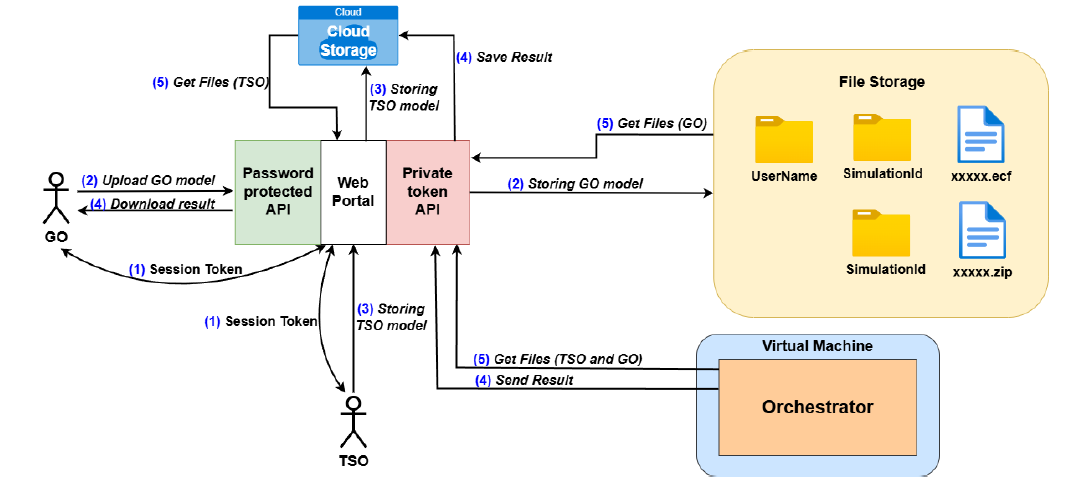
Figure 5 – Security diagram
4.3.2. Internet Access Restrictions
Firewall settings on the VM are adjusted to allow only a whitelist of addresses. This includes the download of the files, license verification server, and communication with the web portal. The VM’s procurement of the TSO and GO models is also done through the portal using a private token API (Figure 5, No. 5).
4.3.3. External Executable Code
Due to the nature of EMT simulations, executable code from GOs must be allowed to be executed for the proper functioning of the simulated models. It may be in the form of scripts run by simulation tool to prepare the model before the simulations, or in the form of compiled executable code (DLLs) that is called by the solver engine during the simulation.
To mitigate the risk of the GOs acquiring access to the grid design files on the virtual machine through this executable code and transmitting them, the following precautions are taken:
- Details of the local storage location are not known to GOs.
- Only a pre-defined set of files is transmitted to GOs.
- The access to the internet is restricted from virtual machines.
4.3.4. TSO and GO Models Confidentiality
Uploaded TSO models are securely stored in a BLOB (Binary Large OBject) storage container, accessible only with a Private API token. On the web portal, they are accessible only by the TSO that uploaded them and the platform admins.
Uploaded GO models are securely stored in a password-protected repository which is only accessible with a private access token which is kept in a secure vault. On the portal, GO users only have access to the models that they as a user have uploaded and these cannot be accessed by any other user including the TSO (Figure 5, No. 3). The results are also sent to a BLOB storage container (Figure 5, No. 4). On the platform, only the GO that started the simulation can have access to their results. The TSO cannot access any GO’s results.
5. Simulation performance and cost
5.1. Performance
A set of simulations was performed on different VMs to evaluate the performance of the platform. VM descriptions are given in Table 1 [5]. Results are given in Table 2. The general purpose VMs are of entry-level quality. Higher quality VMs will be tested in future work. The simulated test case is a Chilean grid [6] that contains 8000 electrical nodes and 80000 control blocks. Two configurations are simulated: one with ~10 scopes (few), and another with ~1000 scopes (many). Simulation time is 10 s, and the time-step is 50 μs. Only single-core execution was tested (multi-core simulations [7] will be used after official deployment). Test cases with many scopes can be slower, thus indicating that storage intensity can be an important factor in selecting the VM. It should be noted that if all 4 simulations are launched together, the results for all would be obtained in 4.4 hours.
| VM type | VM application | Nb. of CPUs | RAM (GB) |
|---|---|---|---|
| VM1 | General purpose, enterprise-grade applications | 2 | 8 |
| VM2 | General purpose, enterprise-grade applications | 4 | 16 |
| Test case | VM type | Initialization (s) | Simulation (s) | Total time (s) |
|---|---|---|---|---|
| Few scopes | VM1 | 600 | 10745 | 11345 (3.15h) |
| Many scopes | VM1 | 600 | 10891 | 11491 (3.2h) |
| Few scopes | VM2 | 600 | 11618 | 12218 (3.4h) |
| Many scopes | VM2 | 600 | 15064 | 15664 (4.4h) |
5.2. Costs
Costs are divided into fixed costs and variable costs. Fixed costs are the ones of the cloud provider account and other add-ons. Overall, the fixed costs are less than 200 USD per month.
Variable costs are related to the cloud service provider running VMs. The monthly fees for running a VM non-stop 24 hours per day, 7 days a week are: 148.19 USD for VM1, 296.38 USD for VM2. Based on timings from Table 2, costs of one simulation study are given in Table 3.
| Test case | VM type | Total time (hours) | Cost/month (USD) | Cost/hour (USD) | Simulation cost (USD) |
|---|---|---|---|---|---|
| Few scopes | VM1 | 3.15 | 148.19 | 0.203 | 0.6397 |
| Many scopes | VM1 | 3.2 | 148.19 | 0.203 | 0.648 |
| Few scopes | VM2 | 3.4 | 296.38 | 0.406 | 1.3779 |
| Many scopes | VM2 | 4.4 | 296.38 | 0.406 | 1.7666 |
In addition, implementation costs apply and depend on the specific TSO requirements. It may require a couple of months of development work.
6. Conclusion
This paper presented a secure, cloud-based EMT Connection Simulation Tool designed to support TSO-GO interconnection studies with high performance, scalability, and data security. The platform addresses the growing demand for EMT-level analysis driven by increased grid complexity and converter-based generation. By enabling remote, parallelized simulations and providing centralized access through a secure web interface, the tool streamlines collaboration between TSOs and GOs while ensuring the confidentiality and integrity of sensitive data. Real-world deployments in France and Chile demonstrate the platform's flexibility, effectiveness, and potential for broader application in power system planning and operation. Future developments will focus on integrating automated validation workflows, advanced result analytics, and enhanced interoperability with planning tools.
References
- Characteristics of Power Plants Seeking Transmission Interconnection As of the End of 2023 [Online]
- AEMO Connections Tool Project [Online]
- J. Mahseredjian, S. Dennetière, L. Dubé, B. Khodabakhchian, and L. Gérin-Lajoie, "On a new approach for the simulation of transients in power systems," Electric Power Systems Research, vol. 77, no. 11, pp. 1514-1520, Sep. 2007, doi: 10.1016/j.epsr.2006.08.027.
- J. A. Ocampo-Wilches, J. Mahseredjian, K. Jacobs, A. G. Pavani and H. Xue, "Comprehensive Full-Scale Converter Wind Park Initialization for Electromagnetic Transient Studies," in IEEE Transactions on Power Delivery, vol. 40, no. 3, pp. 1459-1468, June 2025, doi: 10.1109/TPWRD.2025.3551546.
- Sizes for virtual machines in Azure [Online]
- M. Agüero et al., "Virtual Transmission Solution Based on Battery Energy Storage Systems to Boost Transmission Capacity," Journal of Modern Power Systems and Clean Energy, vol. 12, no. 2, pp. 466-474, 2024, doi: 10.35833/MPCE.2023.000729.
- Ouafi, M., Mahseredjian, J., Peralta, J., Gras, H., Dennetière, S., & Bruned, B. (2023). Parallelization of EMT simulations for integration of inverter-based resources. Electric Power Systems Research, 223, October 2023, 8 pages.